Shortcodes
In case you are not a Gutenberg editor fan, you can use Scrollsequence shortcode and add it to an editor of your choice.
Use the shortcode to display a Scrollsequence elsewhere, like in a builder front or back end. Post ID is required and needs to be an id of a post of type “scroll-sequence”.
[scroll-sequence id="post_id"]Please note that the v1 uses [scrollsequence] shortcode, while v2 uses [scroll-sequence] shortcode. Make sure to use the correct shortcode for the version you are working with.
The shortcode will render the first Path, Container, Scene or Canvas block found in the root of the scroll-sequence post content.
If no blocks are found in the root of the scrollsequence post, a notice will be displayed in the editor indicating that no blocks were found. Please ensure that your blocks are not nested inside a group or other container blocks.
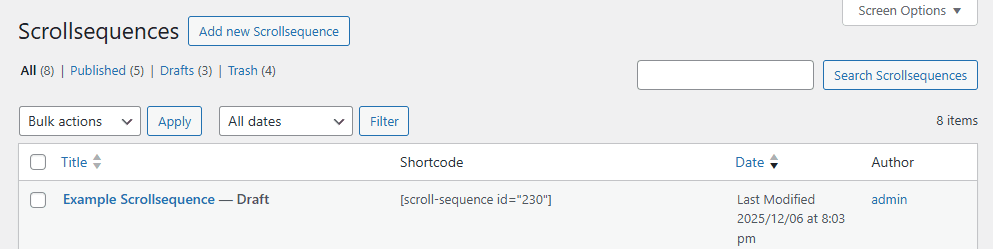
You can find the shortcode in the WordPress admin dashboard by navigating to the “All Scrollsequence” section shown in the “Shortcode” column for the desired scrollsequence.
The shortcode will render on the front end, even if the Scrollsequence post is not published (e.g., draft or private status).
Example usage:
[scroll-sequence id="123"]This shortcode can be added to any WordPress editor that supports shortcodes, including the classic editor, Elementor, WPBakery, and others.